Check-in Online
Do I need to check in online?
Online check-in is available for all trips and allows you to complete your travel details and get ready for boarding before arriving at the port. For bookings departing from 1 March 2027, online check-in will become a mandatory step: remember to complete it before departure. If you choose not to check in online, you will need to go to the ticket office before departure to complete the procedure.
What is online check-in for?
With online check-in, you can prepare for your trip before arriving at the port. In just a few minutes, you can:
- enter and confirm the details of all passengers and vehicles included in the booking;
- check that all information is correct before departure;
- receive your travel document and, on routes where the service is available, your boarding passes directly by email;
- speed up the boarding process.
After my purchase, I only received a receipt: can I travel with it?
No. The receipt confirms your purchase but is not valid for travel. To receive your travel document, you need to complete online check-in: once the procedure is complete, the document to present at the port will be sent to you by email. On routes where the service is available, you will also receive your boarding pass approximately 4 hours before departure.
What happens if I do not complete online check-in?
You will need to complete all the required procedures at the ticket office before boarding, which may involve waiting times. At some ports, the ticket office may be located some distance from the boarding area, so make sure you arrive early enough to complete all procedures on time.
When can I complete online check-in?
You can complete it immediately after purchase and up to 6–8 hours before departure. We recommend completing it as soon as possible and not waiting until the last minute.
Is there a fee for online check-in?
No, online check-in is free of charge.
How can I complete online check-in?
Log in to your personal area, or access your booking using the booking number and email address used for the booking. Then:
- go to the section dedicated to online check-in;
- follow the instructions and enter the required information;
- carefully check all the information you have entered;
- complete and confirm your check-in.
I booked through a travel agency: can I complete online check-in?
Yes, you can complete online check-in even if you booked through a travel agency. Log in here using your GNV booking number and the email address associated with the booking. If you do not know them, contact your travel agency.
I can’t log in or find my booking. What can I do?
Check that the booking number and email address match those shown in your purchase confirmation.
Booking number * (Where can I find it?)
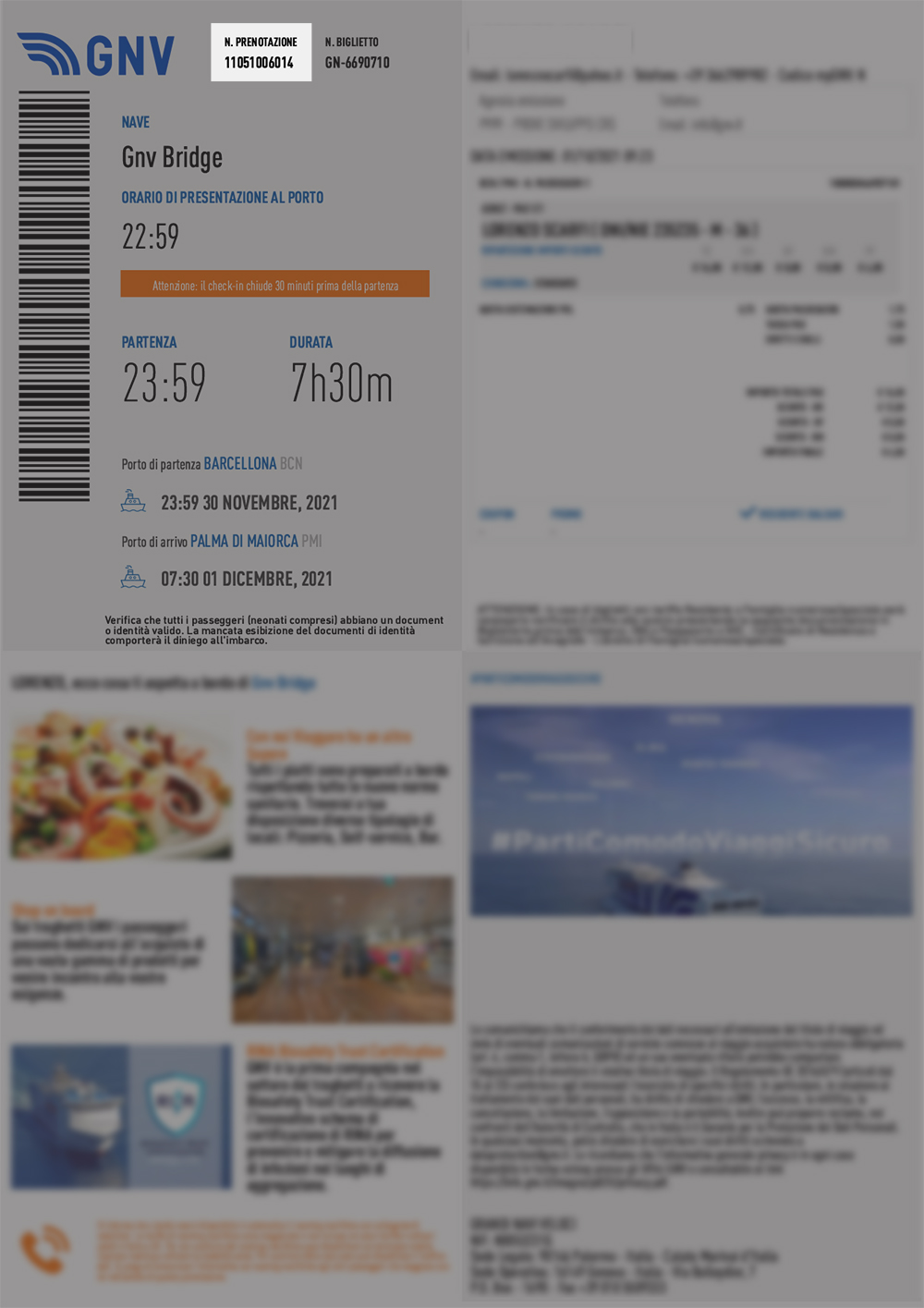
If the problem persists, contact the GNV Contact Center.
What documents and information do I need to complete online check-in?
Have the valid identity documents of all passengers included in the booking ready, as you will be asked to provide some of the information contained in these documents.
If you are travelling with a vehicle, you will also need the vehicle registration document: you will be asked to enter the licence plate number, make, model and fuel type of the vehicle.
Can I complete online check-in for the people travelling with me?
Yes, with a single login you can complete online check-in for all passengers and vehicles included in the booking.
Can I change my details after completing online check-in?
Carefully check all the information before confirming your check-in: once the procedure has been completed, you will no longer be able to change the details yourself online. If you need to correct any information, contact the GNV Contact Center or your travel agency.
If my booking changes and I have already completed online check-in, do I need to do it again?
It depends on whether a new ticket is issued to you, meaning one with a new number.
- If you receive a new ticket, you must complete online check-in again, because the previous check-in is not valid for the new ticket. This happens, for example, when you change the date, time or route of your journey, or when GNV changes your departure. You can find the new number in the email confirming the change.
- If the ticket number remains the same, for example when you only update a passenger’s personal details, you do not need to repeat the check-in. If you had already received your digital boarding pass, contact the GNV Contact Center or the ticket office to check whether it needs to be sent again.
If in doubt, compare the ticket number in the latest email you received with the number associated with the check-in you completed.
I booked a round trip: do I need to complete two online check-ins?
No. If the outbound and return journeys are included in the same booking, online check-in is valid for the entire booking.
Will I receive my boarding pass after completing online check-in?
It depends on the route. On routes where the service is available, you will receive your boarding pass by email approximately 4 hours before departure. On other routes, you will collect your boarding pass at the port (see the next question). The check-in confirmation email will explain how to proceed for your journey.
If I have completed online check-in, do I still need to go to the ticket office?
In some cases, yes. For journeys to destinations outside the Schengen Area, and when document checks or checks on fare discounts for Balearic Islands residents are required, you will need to go to the ticket office or the designated port area before boarding. Online check-in still allows you to arrive with your details already registered and helps speed up the process. Follow the instructions in the confirmation email.
Do I need to print my boarding pass?
No, you can show it directly on your smartphone, using the PDF received by email or by adding it to your wallet, where available.
I haven’t received my boarding pass. What can I do?
Check your spam or junk folder as well: on routes where digital delivery is available, the boarding pass is sent approximately 4 hours before departure. If you do not receive it, go to the port with your booking details: GNV staff will tell you how to proceed.
What should I do if I lose my boarding pass?
You can find it in the email you received. If you deleted the email, contact the GNV Contact Center or your travel agency to request a copy. Alternatively, you can go to the port with your ticket and request a new boarding pass.
When will I know my cabin or seat number?
Your cabin or seat number is assigned and communicated when the boarding pass is issued, where applicable.
Can I choose the number or location of my cabin?
At the moment, it is not possible to choose the cabin number or location yourself: cabin allocation is managed by GNV.
If I have completed online check-in, can I arrive at the port later?
No. Online check-in simplifies the procedures, but it does not change the required arrival times at the port for your departure. Always make sure you follow them.
What is the difference between a travel document and a boarding pass?
The travel document is the document you receive by email after completing online check-in: it confirms your journey and can be presented at the port. The boarding pass is the document you need to board the ship and, where applicable, shows your cabin or seat number. On routes where the service is available, you will receive it by email approximately 4 hours before departure; on other routes, you can collect it at the ticket office or in the designated port area.